Papercute Inline: A Practical Guide to Layered Typography for Designers
In the crowded landscape of digital typography, finding a typeface that balances whimsy with professional utility can be a challenge. Papercute Inline emerges as a distinctive solution, offering a hand-drawn aesthetic that feels both organic and meticulously crafted. Designed by Fanny Coulez and Julien Saurin in Paris, this font family draws direct inspiration from the tactile art of paper cutting. For designers, illustrators, and branding specialists, understanding how this tool fits into a broader creative workflow is essential. It is not merely a font; it is a modular system designed for layering, requiring a specific approach to unlock its full potential.
Understanding the Architecture of Papercute Inline
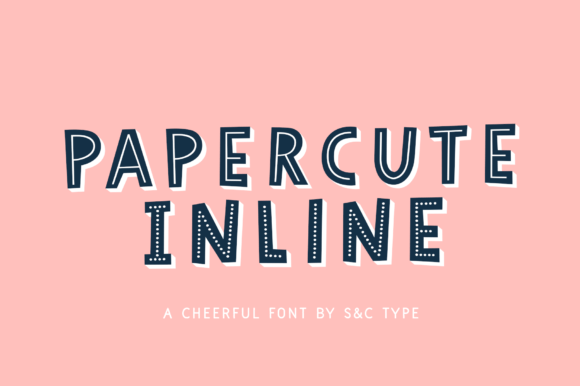
At its core, Papercute Inline is defined by its modularity. Unlike standard typefaces that arrive as a single, static entity, this family comprises eight distinct styles. These include variations such as 3D effects, outlines, full lines, and dotted lines. This structural diversity allows users to deconstruct the letterforms and rebuild them according to their visual needs. The design philosophy here is rooted in playfulness without sacrificing legibility. The rounded, soft edges mimic the slight imperfections of scissors gliding through cardstock, creating a warm, inviting texture that sterile geometric fonts often lack.
The creators intended for these styles to be used in conjunction with one another. By superimposing different layers—such as placing a solid fill behind a dotted outline—designers can create complex, multi-dimensional typographic compositions. This process transforms simple text into graphic elements that carry weight and depth. However, this flexibility comes with a learning curve. It requires a shift in mindset from selecting a font to constructing a typographic illustration.
Comparison with Standard Display Fonts
When evaluating Papercute Inline against traditional display fonts, the primary difference lies in the level of user involvement required. Most commercial fonts are "plug-and-play." You select the weight, adjust the kerning, and the job is done. In contrast, Papercute Inline demands a more hands-on approach. It is comparable to purchasing a kit of raw materials rather than a finished product. For professionals accustomed to rapid turnaround times, this might initially seem like a limitation. However, for projects where uniqueness is paramount, this extra step provides a significant competitive advantage.
Consider the alternative: using a standard script or handwritten font. While these are easy to implement, they often suffer from overuse. Because they are static, every designer using the same font produces identical results. With Papercute Inline, the ability to mix and match layers means that no two implementations need look exactly alike. You can choose a bold 3D effect for a headline in one project and a subtle dotted outline for a secondary header in another, all while maintaining brand consistency. This versatility makes it a more sustainable long-term asset for brands seeking a distinctive voice.
The Tradeoff Between Convenience and Customization
The decision to use a layered font system involves weighing convenience against customization. Standard fonts offer speed and predictability. They integrate seamlessly into web CSS and basic word processing documents. Papercute Inline, however, shines in environments where visual control is prioritized over automation. It is less suited for body copy in long-form articles and more appropriate for headlines, logos, packaging, and social media graphics.
For web designers, implementing layered fonts can present technical challenges. While possible with advanced CSS stacking or SVG implementations, it is not as straightforward as calling a single font family. Therefore, this tool is best reserved for high-impact visual moments rather than functional interface text. Understanding this limitation helps prevent frustration during the design process.
Technical Workflow and Software Compatibility
To fully leverage the capabilities of Papercute Inline, compatible software is necessary. Adobe Photoshop is frequently cited as an ideal environment for this type of work due to its robust layer management and blending options. The process involves typing the text in one style, duplicating the layer, changing the font style to another variant, and adjusting the color or position. This manual superimposition allows for precise control over shadows, offsets, and color contrasts.
Illustrator users can also benefit from this system, particularly when creating vector-based logos or print materials. The clean lines of the font ensure that scaling does not result in pixelation, maintaining the crispness of the "paper cut" illusion. It is important to note that while the font is easy to read, the layered effects can reduce legibility if not handled with care. High contrast between layers is crucial. For instance, placing a light gray dotted line over a dark blue solid fill creates clarity, whereas low-contrast combinations may cause the text to blur visually.
- Layer Management: Keep your layers organized and named clearly to avoid confusion when toggling visibility.
- Color Theory: Use complementary colors to distinguish between the base layer and the decorative outlines.
- Spacing: Adjust tracking slightly when layering, as overlapping elements can sometimes appear cramped.
Ideal Use Cases and Industry Applications
Papercute Inline is particularly well-suited for industries that value approachability and creativity. The education sector, for example, benefits from its friendly aesthetic. Textbooks, e-learning modules, and classroom materials can use this font to make content feel less intimidating and more engaging for students. Similarly, the children’s product market—from toy packaging to apparel—aligns perfectly with the font’s playful nature.
In the realm of food and beverage, artisanal brands often seek packaging that feels handmade and authentic. Papercute Inline can evoke the feeling of a local craft shop or a boutique bakery. When used on labels, the layered effect can mimic the look of stamped or cut-out labels, reinforcing the brand’s narrative of quality and care. Event planning is another strong fit, particularly for weddings, birthdays, and informal gatherings where invitations require a personal, charming touch.
However, it is less appropriate for corporate sectors that prioritize seriousness and authority, such as law, finance, or heavy industry. In these contexts, the whimsical nature of the font may undermine the perceived professionalism of the brand. Designers must always align the typeface choice with the brand’s core values and target audience expectations.
Evaluating Alternatives and Making the Right Choice
When deciding whether Papercute Inline is the right resource for your project, consider the end goal. If you need a quick, standardized solution for a large volume of text, a traditional sans-serif or serif family may be more efficient. If you are looking for a unique, eye-catching header that stands out in a saturated market, the investment in layering is worthwhile.
There are other hand-drawn fonts available, but few offer the same systematic approach to layering. Many alternatives provide only a single weight or style, limiting their flexibility. Some competitors offer pre-made 3D effects, but these are often rigid and cannot be customized. Papercute Inline strikes a balance by providing the components for customization while maintaining a cohesive design language across all eight styles.
Ultimately, the value of Papercute Inline lies in its ability to bridge the gap between typography and illustration. It empowers designers to create custom lettering without needing advanced drawing skills. By understanding its strengths, limitations, and optimal workflows, you can make an informed decision about whether this Parisian-designed font belongs in your creative toolkit. It is a specialized tool for specific jobs, offering charm and uniqueness for those willing to engage with its layered potential.