Building Immersive Worlds: A Comprehensive Guide to Laser-Cut RPG Terrain and Modular Tabletop Scenery
In the vibrant world of tabletop role-playing games (RPGs) like Dungeons & Dragons and Pathfinder, the story is king. However, the stage upon which that story unfolds plays a pivotal role in shaping the experience. For decades, gamers relied on hand-drawn maps or static plastic miniatures. Today, a revolution in digital fabrication has transformed how we visualize these fantasy realms. At the forefront of this movement is RPG terrain and miniature building design for laser cutting. This technology allows Dungeon Masters and hobbyists to create intricate, three-dimensional castles, dungeons, and medieval villages with unprecedented precision and speed.
Whether you are a seasoned wargaming veteran or a beginner looking to enhance your first campaign, understanding the ecosystem of laser-ready vector files and modular scenery kits is essential. This guide explores the purpose, significance, and practical application of these digital designs, helping you bridge the gap between imagination and physical reality.
What Exactly Is Laser-Ready RPG Terrain?
At its core, laser-ready RPG terrain refers to digital design files specifically engineered to be cut by CO2 or diode laser cutters (such as Glowforge, xTool, or Universal Laser Systems). Unlike standard image files, these designs contain precise geometric data that tells the machine exactly where to cut through material and where to merely engrave the surface.
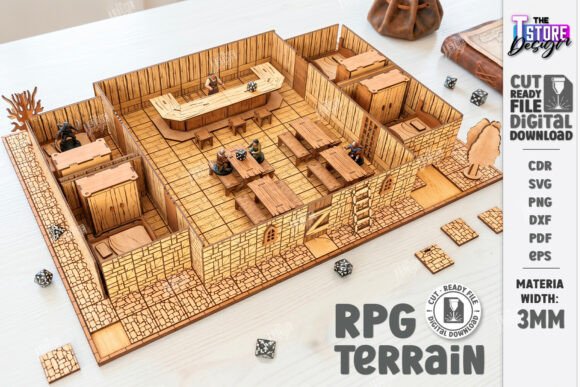
These designs typically come in a bundle of universal file formats, including SVG, EPS, DXF, PDF, and PNG. This variety ensures compatibility with almost any cutting software, from LightBurn to Adobe Illustrator. The magic lies in the "modular" nature of these files. Instead of creating a single, static castle, designers create interlocking pieces—walls, floors, towers, and roofs—that can be assembled in countless configurations. This modularity mirrors the flexibility of the RPG itself, allowing the game board to evolve dynamically as the players explore new areas.
The Anatomy of a Vector File: Red Lines and Black Lines
One of the most common points of confusion for newcomers is interpreting the visual cues within the design files. In a standard laser-cutting package for tabletop scenery, you will often see a specific color-coding system:
- Red Lines: These indicate where the laser should cut all the way through the material. These lines define the outer edges of your walls, the slots for interlocking pieces, and the separation of individual components.
- Black Lines: These indicate where the laser should engrave or etch the surface. This is used for adding texture to stone walls, wood grain patterns on floors, or decorative runes on dungeon doors without weakening the structural integrity of the piece.
Understanding this distinction is crucial. If your software interprets a cut line as an engrave line, your pieces won't separate. Conversely, if an engrave line is set to cut, you might slice a detailed texture right off your model. Always verify your machine settings and software compatibility before starting a job.
Why Choose Laser-Cut Scenery Over Traditional Methods?
The shift toward laser-cut architecture in the gaming community is driven by three main factors: precision, customization, and efficiency.
- Precision and Detail: Hand-carving foam or assembling plastic sprues can be time-consuming and often lacks fine detail. Laser cutters can reproduce intricate brickwork, gothic arches, and complex joinery slots with sub-millimeter accuracy. This results in professional-grade dioramas that look like they belong in a movie set.
- Material Versatility: While 3mm or 4mm plywood is the industry standard for sturdy, paintable terrain, laser files can also be used on acrylic, MDF, cardstock, or even leather. This allows creators to match the aesthetic of their game, whether it's a gritty, wooden fortress or a sleek, futuristic sci-fi base.
- Reusability and Storage: Modular kits are designed to be taken apart. A single bundle of files can generate a small cottage for one session and a massive keep for the next. Once the game is over, the pieces flat-pack easily into a box, solving the notorious storage problem faced by many hobbyists.
From Digital File to Physical Diorama: The Workflow
Creating your own tabletop scenery is a rewarding process that blends digital creativity with hands-on craftsmanship. Here is how the typical workflow looks for a modern gamer:
Step 1: Acquiring the Designs
Users purchase a digital product, usually delivered as a ZIP archive. Inside, you will find the aforementioned SVG, EPS, DXF, PDF, and PNG files. It is important to note that these are digital products; no physical wood is included. This instant delivery model means you can start building minutes after purchase.
Step 2: Software Preparation
Import your chosen file format into your laser cutter's software. This is the stage where you ensure the "Red = Cut" and "Black = Engrave" rules are applied correctly. You may also need to scale the design to fit your specific battle grid size (e.g., ensuring 1 inch equals 5 feet in-game scale).
Step 3: Material Selection and Cutting
Select your material. Birch plywood is popular for its light color and smooth grain, which takes paint well. Load the sheet into the machine, run a test cut to determine the correct power and speed settings, and then let the laser do the work. The machine will precisely carve out every wall segment and tower component.
Step 4: Assembly and Finishing
Once cut, the pieces are cleaned of any soot (a byproduct of laser cutting) and assembled. Most modular kits use friction-fit joints or simple wood glue. Finally, the creator paints the terrain. This is where the true creativity shines, turning raw wood into a moss-covered ruin or a torch-lit dungeon corridor.
The Broader Impact on Creativity and Education
Beyond the immediate utility for gaming nights, the rise of laser-cut RPG terrain has significant implications for education and creative industries. In STEM education, these projects serve as excellent introductions to CAD (Computer-Aided Design), geometry, and engineering principles. Students learn about tolerances (the gap needed for two pieces to fit together) and structural stability while building something fun.
For small businesses and content creators, selling laser-ready files has become a viable economic model. Designers can create a single high-quality "Fantasy Gaming Set" and sell it globally without worrying about shipping heavy physical goods. This democratization of manufacturing allows independent artists to thrive alongside major corporations.
Common Misunderstandings and Tips for Success
Despite the ease of use, there are pitfalls to avoid. A frequent assumption is that all laser cutters are the same. In reality, a 40W desktop diode laser behaves differently than a 100W CO2 industrial machine. Users must calibrate their speed and power settings based on their specific hardware. Additionally, always check the material thickness specified in the file description. A design made for 3mm plywood will not fit together correctly if cut from 4mm stock unless the file includes adjustable kerf settings.
Another tip for beginners: Don't be afraid to modify the files. One of the greatest advantages of owning the vector source files (like SVG or DXF) is the ability to edit them. Want a taller tower? Extend the wall segments in your design software. Need a secret door? Delete a few cut lines. The digital nature of these products empowers you to be the architect of your own world.
Conclusion: Elevating the Tabletop Experience
The integration of laser-cut RPG terrain and miniature building designs has fundamentally changed the landscape of tabletop gaming. It offers a perfect blend of technological precision and artistic expression, allowing Dungeon Masters to craft immersive environments that deepen player engagement. From the intricate vector lines of a digital file to the painted, interlocking walls of a physical castle, the journey of creating laser-ready scenery is as rewarding as the game itself.
Whether you are downloading a zip archive containing SVG, EPS, and PDF files for your next Pathfinder session or designing your own modular map from scratch, the tools available today have never been more accessible. By understanding the nuances of cut versus engrave lines, selecting the right materials, and embracing the modular philosophy, you can transform your dining room table into a legendary realm of adventure.
Remember, if you ever encounter issues with file formats or need specific adjustments like different PNG colors or sizes, reaching out to the designer is often the best course of action. The community thrives on collaboration and shared knowledge. Happy cutting, and may your critical hits be frequent!