Mastering Shine: A Practical Look at Procreate Glossy Lettering Brushes
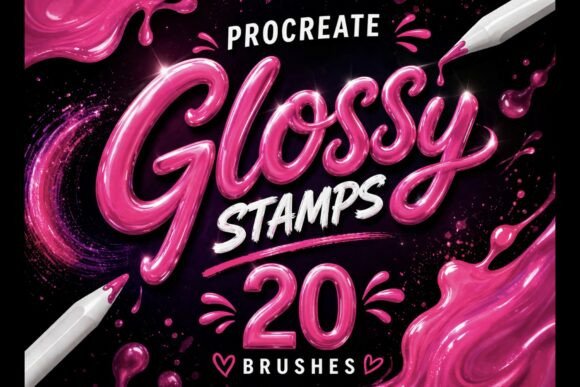
Digital lettering and illustration have evolved significantly over the last decade, moving from flat vector styles to rich, textured compositions that mimic real-world materials. Among the most sought-after effects in modern design is the glossy, liquid finish that adds depth and dimensionality to typography and characters. Achieving this look manually requires a sophisticated understanding of light sources, reflection, and blending modes. However, specialized tools like the Procreate Glossy Lettering Brushes set aim to streamline this process, offering artists a way to apply complex shine effects with greater efficiency. This evaluation explores the utility, quality, and practical application of this 20-brush collection for digital creators working on the iPad.
The Mechanics of Digital Gloss
The primary appeal of any specialty brush set lies in its ability to replicate physical media or specific lighting conditions without requiring hours of manual rendering. The Procreate Glossy Lettering Brushes are engineered to simulate the behavior of light hitting a smooth, reflective surface. Unlike standard round brushes that lay down flat color, these tools incorporate transparency and opacity variations within the stroke itself. This allows the artist to create the illusion of a three-dimensional curve or a wet, shiny texture simply by drawing a line.
In practice, this means the difference between a piece of text that looks like it was typed on a screen and one that appears to be made of polished glass or candy. The set includes 20 distinct variations, which is a significant number for a niche tool. This variety suggests an attempt to cover different angles of reflection, levels of viscosity, and stroke weights. For a professional illustrator, having options is crucial; a highlight on a bold sans-serif font requires a different approach than a delicate shimmer on a script typeface. The diversity within this pack attempts to address those nuanced needs, providing everything from broad, sweeping glares to tight, pinpoint sparkles.
Workflow Efficiency and Usability
One of the most critical factors for freelancers and agency professionals is workflow speed. Manually painting highlights involves creating multiple layers, selecting soft airbrushes, masking, and adjusting blend modes like "Overlay" or "Color Dodge." While this method offers ultimate control, it is time-consuming. The value proposition of the Procreate Glossy Brushes lies in their ability to condense these steps. By using a brush that inherently contains the highlight data, an artist can achieve a similar result in a single pass or with minimal layer management.
Usability testing on the iPad reveals that these brushes respond well to pressure sensitivity, a cornerstone feature of Procreate. As you press harder, the opacity and size of the glossy stroke adjust naturally, allowing for dynamic control over the intensity of the shine. This responsiveness makes the tools feel less like a static stamp and more like a fluid instrument. For content creators who need to produce social media graphics quickly, this reduction in friction between idea and execution is invaluable. It allows for rapid iteration, where different lighting scenarios can be tested instantly without rebuilding the entire effect from scratch.
Ideal Applications and Use Cases
While the name suggests a focus on typography, the versatility of these brushes extends into broader illustration contexts. Here is how different types of creators might leverage this asset:
- Typography and Hand Lettering: This is the obvious primary use case. Adding a glossy ridge to the center of a bubble letter or a sharp specular highlight to a serif font can make the text pop against busy backgrounds. It is particularly effective for logos, YouTube thumbnails, and promotional banners where readability and visual impact are paramount.
- Kawaii and Cute Illustrations: The "kawaii" aesthetic relies heavily on the depiction of cuteness through exaggerated features, often including large, shiny eyes or slick, colorful surfaces on food items and characters. The liquid-like strokes provided by this set are perfectly suited for adding that signature "wet" look to donuts, fruits, and character cheeks.
- Product Mockups and Branding: Entrepreneurs creating digital mockups for packaging or app icons often need to simulate materials like plastic, glass, or enamel. These brushes can provide the necessary finishing touches to make a flat design appear tangible and premium.
- Social Media Content: In the fast-paced environment of Instagram and TikTok, static images need to grab attention immediately. High-contrast, shiny elements tend to perform well visually, stopping the scroll more effectively than flat designs.
Evaluating Quality and Consistency
When assessing digital assets, consistency is key. A common pitfall with third-party brush sets is that they often feel disjointed, with some brushes feeling too grainy while others are too smooth. The Procreate Glossy Lettering Brushes maintain a cohesive visual language across the 20 included tools. The edges of the strokes are generally clean, avoiding the pixelation that can occur with poorly configured raster brushes. This ensures that the final output remains crisp, even when viewed on high-resolution Retina displays.
However, users should be aware that "glossy" is a stylistic choice that does not fit every project. The strength of these brushes is also their limitation; they impose a specific aesthetic. If a project calls for a matte, chalky, or rough texture, these tools will not be appropriate. Furthermore, because the shine is baked into the brush tip, it can sometimes lack the subtle randomness of natural light. Professional artists may find themselves needing to combine these brushes with manual blending techniques to break up perfect patterns and achieve a more organic look. The tools are excellent for establishing the base of a highlight, but they work best when treated as part of a larger toolkit rather than a magic wand solution.
Compatibility and Technical Considerations
It is important to note that this asset is designed exclusively for Procreate on the iPad. This limitation is standard for .brushset files but is worth reiterating for users who work across multiple platforms like Photoshop or Affinity Designer. The instant download format facilitates immediate integration into an existing library, allowing creators to start experimenting within minutes of purchase. There is no complex installation process, which reduces technical barriers for less tech-savvy users.
From a file management perspective, keeping 20 specific brushes organized is essential. Since they serve a specific function, it is advisable to group them into a dedicated folder within the Procreate brush library. This prevents clutter and ensures that when the specific need for a shine effect arises, the right tool is immediately accessible. For teams or educators sharing workflows, standardizing on a specific set of gloss brushes can help maintain brand consistency across different designers' outputs.
Long-Term Value for Creators
The true measure of a digital tool's worth is its longevity in a creator's daily routine. Will this be used once and forgotten, or will it become a staple? Given the enduring popularity of 3D-style typography and the continued demand for high-polish illustrations in marketing, the Procreate Glossy Lettering Brushes offer substantial long-term value. Trends in digital art cycle frequently, but the desire for depth and dimension remains constant. Whether the trend is Y2K chrome, glassmorphism, or candy-coated 3D text, the fundamental physics of light reflection that these brushes simulate remain relevant.
For Etsy sellers and independent illustrators, the ability to produce high-quality, eye-catching assets quickly translates directly to productivity and potential revenue. The time saved on rendering highlights can be reinvested into concept development or client communication. Moreover, the professional finish these brushes provide can elevate the perceived value of the final product, allowing creators to command higher rates for their services.
Final Verdict
The Procreate Glossy Lettering Brushes set represents a focused, high-utility addition to the digital artist's arsenal. It successfully bridges the gap between complex manual rendering and efficient digital production. While it is not a replacement for foundational knowledge of light and form, it serves as a powerful accelerator for those who already understand these principles. The variety of 20 brushes provides enough flexibility to handle different typographic weights and illustrative styles, making it a versatile choice for letterers, kawaii artists, and graphic designers alike.
Ultimately, this toolset is best suited for professionals and serious hobbyists looking to enhance their workflow with trendy, high-impact visual effects. By integrating these brushes into a balanced workflow—using them to establish base highlights before refining manually—creators can achieve stunning, shiny results that resonate with modern audiences. For anyone looking to add a layer of polish and professionalism to their iPad art, this collection is a worthy investment that delivers on its promise of smooth, liquid-like strokes.