Crafting Timeless Memories: A Guide to Laser-Cut 3D Baby Photo Albums
In the digital age, where thousands of photos reside silently in cloud storage or on smartphone screens, there is a profound resurgence in the desire for tangible keepsakes. Parents and gift-givers are increasingly turning toward physical memory books that not only store images but also celebrate the milestone moments of a child’s early life. Among the most innovative tools for creating these heirlooms is the Baby Photo Album Laser Cut Book Cover. This technology allows crafters, small business owners, and hobbyists to produce stunning, 3D layered nursery photo albums that serve as both functional journals and decorative art pieces.
Understanding how to utilize laser-ready files such as SVG, DXF, and EPS can transform a simple woodworking project into a professional-grade product. Whether you are using a CNC router or a desktop laser cutter, mastering these digital patterns opens up a world of creativity for making personalized baby gifts and newborn keepsakes.
The Significance of Personalized Memory Keeping
A baby’s first year is a whirlwind of rapid growth and change. From the first smile to the first step, these milestones are fleeting. While social media allows for instant sharing, it often lacks the permanence and emotional weight of a physical object. A personalized wooden memory book offers a dedicated space to document these events, combining photography with written reflections.
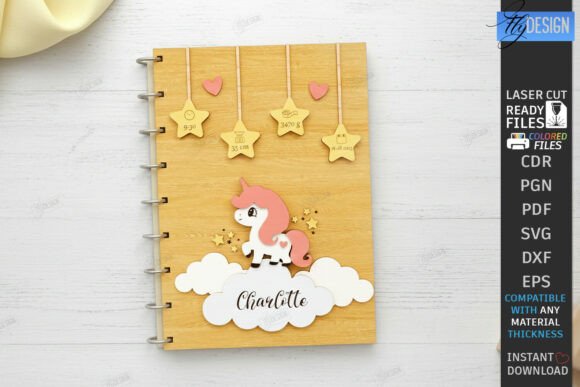
The appeal of a 3D Baby Photo Album lies in its depth and texture. Unlike traditional flat scrapbooks, laser-cut wooden covers feature intricate layers that create a shadow-box effect. This artistic approach elevates the album from a mere container to a centerpiece in a nursery. For businesses, offering custom name baby stats—such as birth date, weight, and length—adds a layer of exclusivity that mass-produced items cannot match. This personalization is key to modern consumer preferences, where uniqueness and sentimental value drive purchasing decisions.
Understanding Laser Cutting Technology for Crafters
To successfully create these albums, one must understand the intersection of design and machinery. Laser cutting is a subtractive manufacturing process that uses a high-powered laser to cut or engrave materials. For wood-based projects, this technique offers precision that is difficult to achieve by hand. However, the quality of the final product depends heavily on the quality of the digital file used.
When purchasing or designing Digital Download CNC Files, it is crucial to recognize the different file formats included in a typical archive. A comprehensive package usually includes:
- SVG (Scalable Vector Graphics): Ideal for most web-based design software and many laser controllers.
- DXF (Drawing Exchange Format): Often preferred for CAD software and specific laser programs due to its structural simplicity.
- EPS (Encapsulated PostScript): Useful for graphic designers using Adobe Illustrator.
- PNG (Portable Network Graphics): Typically used for previewing the design or for print-on-demand services, though not suitable for cutting paths.
- PDF (Portable Document Format): Great for viewing instructions or manual tracing if necessary.
Each format serves a purpose, but compatibility with your specific machine is paramount. The versatility of these files means that whether you are a beginner with a basic diode laser or an experienced operator with an industrial CO2 laser, you can find a workflow that suits your needs.
Navigating File Compatibility and Software Issues
One of the most common challenges faced by crafters is software distortion. It is a well-documented issue that certain programs, such as LightBurn, may sometimes distort the dimensions of files, particularly when importing SVG file formats. This can lead to misaligned layers in a 3D project, ruining the aesthetic of the final album.
To mitigate this, experts recommend using the DXF file format when working with LightBurn. DXF files tend to maintain their geometric integrity better across different platforms, ensuring that the cut lines remain accurate. If you encounter issues with scaling or alignment, switching to DXF is often the quickest solution. Additionally, always verify the dimensions of your design within the software before sending it to the laser cutter. A quick test cut on scrap material can save hours of wasted wood and frustration.
Decoding the Design: Cut Lines vs. Engrave Lines
For those new to laser cutting, interpreting the design file is a critical skill. Most professional Laser Ready Files use color-coding to distinguish between different actions the machine needs to take. In the context of a Baby Photo Album Laser Cut Book Cover, understanding this code is essential for assembly.
Typically, the design will follow this standard:
- Red Line – CUT: These lines indicate where the laser should cut completely through the material. This is used for the outer edges of the album cover and the internal windows where photos will be placed.
- Black Line – ENGRAVE: These lines tell the laser to etch the surface without cutting through. This is used for text, such as the baby’s name, birth statistics, and decorative details like stars or animals.
It is vital to ensure your cutting machine and software are compatible with these color settings. Some software requires you to assign specific power and speed settings to each color layer. For instance, cutting wood requires higher power and slower speed, while engraving requires lower power and faster speed to avoid burning the material too deeply. Proper setup ensures clean cuts and crisp engravings, resulting in a polished final product.
Practical Applications and Business Opportunities
The demand for Milestone Baby Scrapbook designs is not limited to hobbyists. There is a thriving market for handmade, personalized baby gifts. Etsy sellers and local craft fair vendors can leverage these 3D Layered Nursery Photo Album Designs to create high-margin products. By offering customization options—such as changing the wood type, stain color, or adding specific birth stats—crafters can charge a premium for their work.
Moreover, these albums make exceptional gifts for baby showers, christenings, and first birthdays. They serve as a Newborn Keepsake Album that parents will treasure for decades. The durability of wood ensures that the album can withstand handling, unlike paper-based alternatives that may tear or fade over time.
For educators and community centers, teaching laser cutting through projects like these can introduce students to STEM concepts, including geometry, material science, and digital design. It bridges the gap between traditional craftsmanship and modern technology, providing a hands-on learning experience that is both engaging and productive.
Tips for Success and Customer Support
Creating a flawless Wood Scrapbook requires attention to detail. Here are some best practices to ensure success:
- Material Selection: Use high-quality plywood or solid wood sheets. Avoid woods with excessive knots or glue lines, as these can interfere with the laser beam.
- Test Fits: Before assembling the final album, do a dry fit of all layers. This helps identify any tight spots or misalignments early in the process.
- Finishing Touches: Sand the edges lightly after cutting to remove char marks. Apply a non-toxic sealant or stain to protect the wood and enhance its natural grain.
If you are sourcing your designs from online shops, remember that support is often available. If you need a different type of file or a specific color size of PNG file, do not hesitate to reach out. Many designers are willing to accommodate special requests to ensure customer satisfaction. Please write a message if you have any questions regarding compatibility or design modifications. Engaging with the creator can also provide insights into best practices for their specific files.
Finally, staying connected with design creators can keep you updated on new trends and releases. Following your favorite shops allows you to see future releases in your feed, ensuring you always have access to the latest Custom Name Baby Stats Memory Book patterns. This ongoing relationship fosters a community of makers who share tips, troubleshoot issues, and inspire each other to create beautiful, lasting memories.
In conclusion, the Baby Photo Album Laser Cut Book Cover represents a perfect blend of tradition and technology. By understanding the tools, files, and techniques involved, anyone can create a meaningful keepsake that honors the precious early moments of a child’s life. Whether for personal use or commercial venture, these Personalized Wooden Memory Books are a testament to the enduring power of tangible memory in a digital world.